Naming system that translates human-readable domain names (www.example.com) into IP Addresses. It can thus be seen as the internet phone book.
Browsers use this service along with the local resolvers (like /etc/hosts on Linux) to look up URLs.
The DNS is a distributed database implemented in a hierarchy of DNS Servers. It functions as an Application Layer protocol that allows Hosts to query the distributed database.
All DNS query and response messages are sent by UDP using port 53.
Response messages contain Resource Records stored in the server.
Features
Caching: DNS traffic and the delay for using DNS can be reduced when a nearby DNS server has cached (locally stored) the translation of the queried website.Host Aliasing: a host with a complicated host name can have one or more alias names that are easier to remember or shorter to write.Mail Server Aliasing: allows aliasing for E-mail host servers, e.g. bob@yahoo.com instead of relay1.west-coast.yahoo.com.Load Distribution: websites, that have a lot of traffic, can be replicated over multiple servers each with different IP addresses. The DNS can then rotate at each request over these IP Addresses to distribute traffic evenly over these servers.
Hierarchy
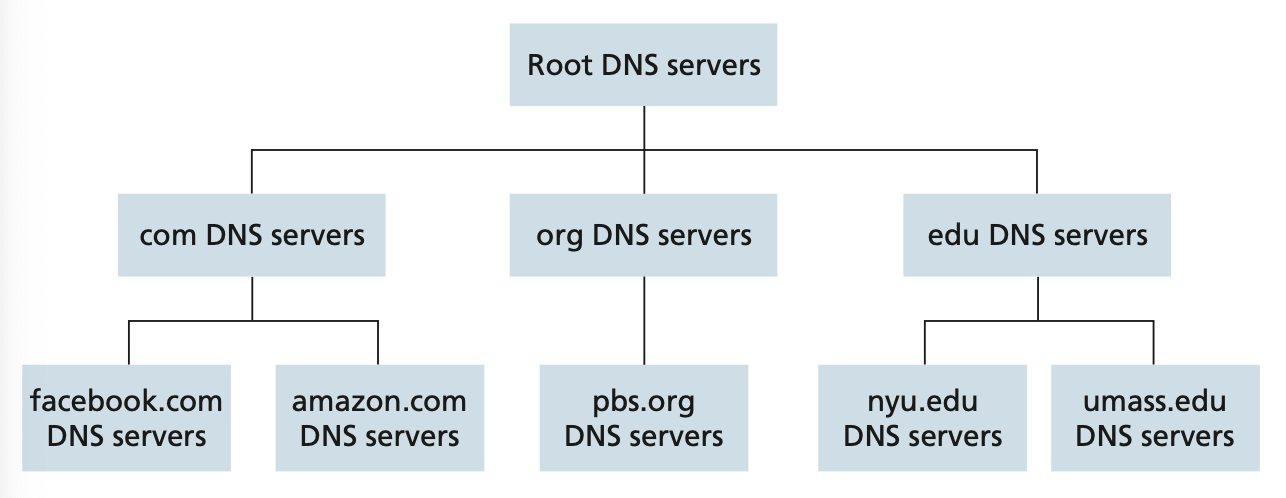
To deal with scale the DNS uses a large number of servers organised in a hierarchy distributed around the world. No single DNS server holds all the mappings for all the hosts on the internet.
There are three classes of DNS servers:
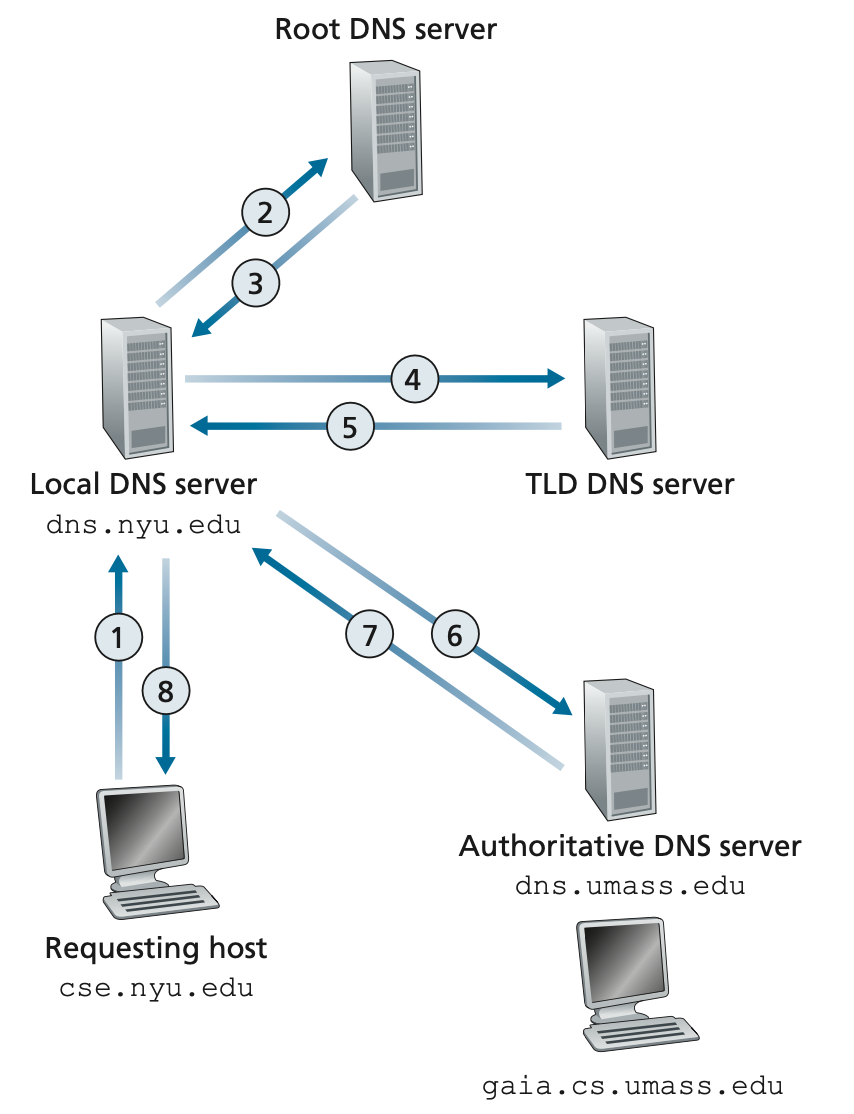
When an IP address is looked up in a DNS an end user first queries a local/recursive DNS server, which in turn queries a root DNS server if the address is not cached. The process continues in the numbered steps below.
Query Methods
- Recursive queries: delegates the entire resolution process to another DNS server.
- Iterative queries: obtains partial information from another DNS server and continues the resolution process independently.
Message format
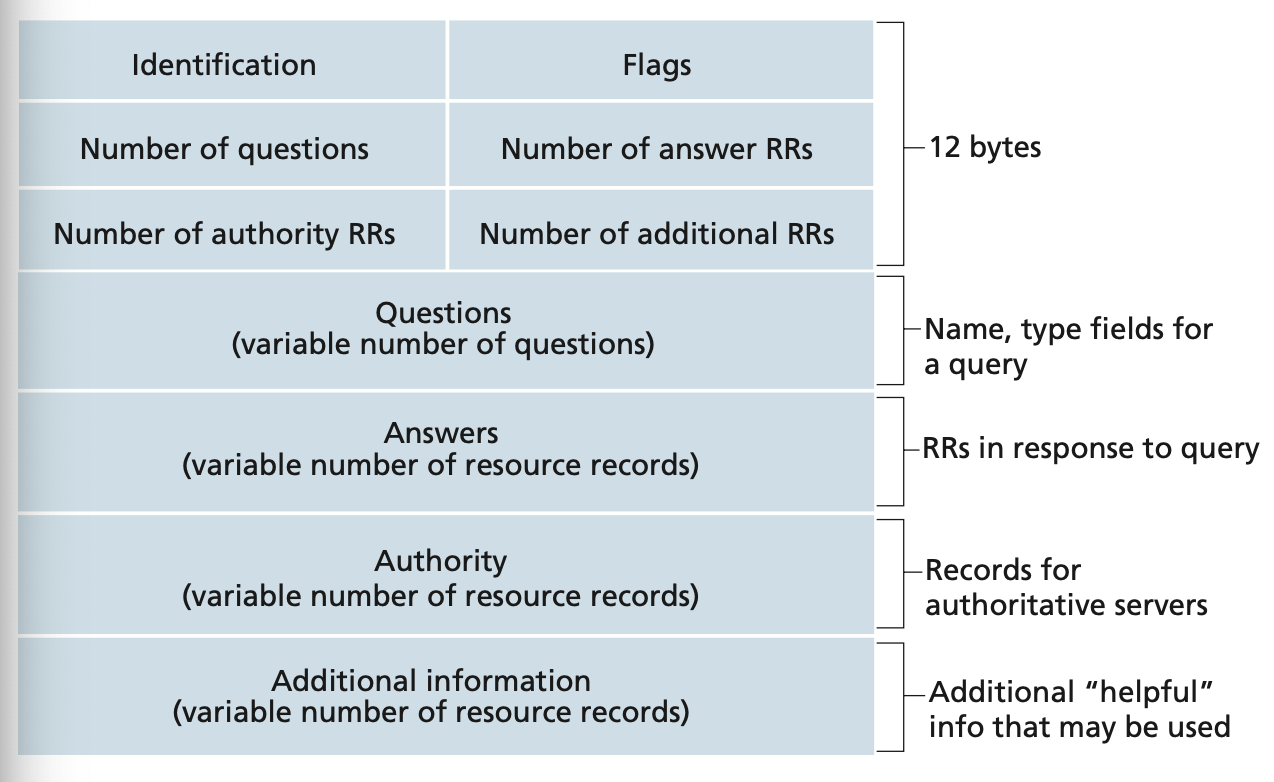
- Identification: ID for the query
- Flags:
- 0 indicates that the message is a query.
- 1 indicates that the message is a reply.
These messages hold Resource Records.
Configuration
All DNS Servers work with three kinds of config files:
- Local DNS config files
- Zone files
- Reverse name resolution files
Security
DNS is generally unencrypted. Devices on local WLAN and internet providers can therefore intercept DNS request traffic, which poses a privacy risk.
There are therefore solutions for DNS encryption:
- DNS over TLS (DoT)
- DNS over HTTPS (DoH)
- DNSCrypt
Tools
Examples
Using DNS
> nslookup youtube.com

Server: 192.168.0.1
Address: 192.168.0.1#53

Non-authoritative answer:
Name: youtube.com
Address: 216.58.211.14
DNS hierarchy of servers