A protocol in The Application Layer that is implemented at both client and server so that they can exchange application data through HTTP messages.
HTTP uses the default Port number 80.
On the client side, HTTP is typically implemented by Web Browsers.
HTTP uses TCP as its underlying protocol in The Transport Layer.
HTTP is said to be a stateless protocol because an HTTP server does not maintain any information about the connecting Clients. Information about prior connections are therefore handled by Cookies.
Implementations
- HTTP/1.0 with Persistent Connections.
- HTTP/1.1 with Non-Persistent Connections.
- HTTP/2 with Binary Framing, Message Prioritization and Server Pushing.
- HTTP/3 implemented over QUIC (contrary to the other versions which use TCP).
Message Structure
Request message
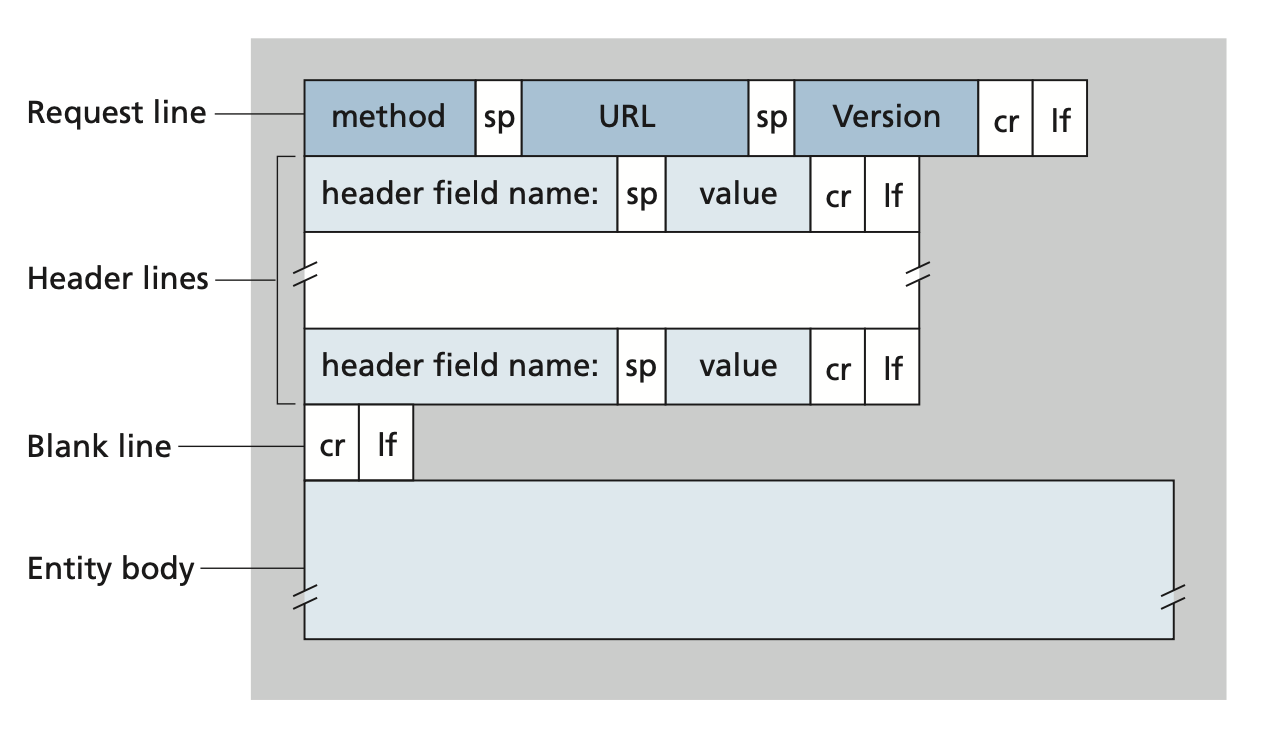 The first line of an HTTP Request message is the request line, which has 3
fields:
The first line of an HTTP Request message is the request line, which has 3
fields:
- Method: defines the type of request, e.g.
GET,POST,HEAD,PUTorDELETE. - URL: the object which the request involves.
- Version: the version of HTTP used in the request.
The subsequent lines are called header lines. These provide additional information about the request or response. Each header line consists of a field name followed by a colon and then the field value.
Method types
GET: Requests a specific resource. Additional data can be passed to the server via query strings in the URL (e.g.?param=value).POST: Sends data to the server. It can handle multiple types of input, such as text, PDFs, and other forms of binary data. This data is appended in the request body present after the headers. The POST method is commonly used when sending information (e.g. forms/logins) or uploading data to a website, such as images or documents.HEAD: Requests the headers that would be returned if a GET request was made to the server. It doesn’t return the request body and is usually made to check the response length before downloading resources.PUT: Creates new resources on the server. Allowing this method without proper controls can lead to uploading malicious resources.DELETE: Deletes an existing resource on the web server. If not properly secured, can lead to a Denial-of-service (DoS) Attack by deleting critical files on the web server.OPTIONS: Returns information about the server, such as the methods accepted by it.PATCH: Applies partial modifications to the resource at the specified location.
Response message
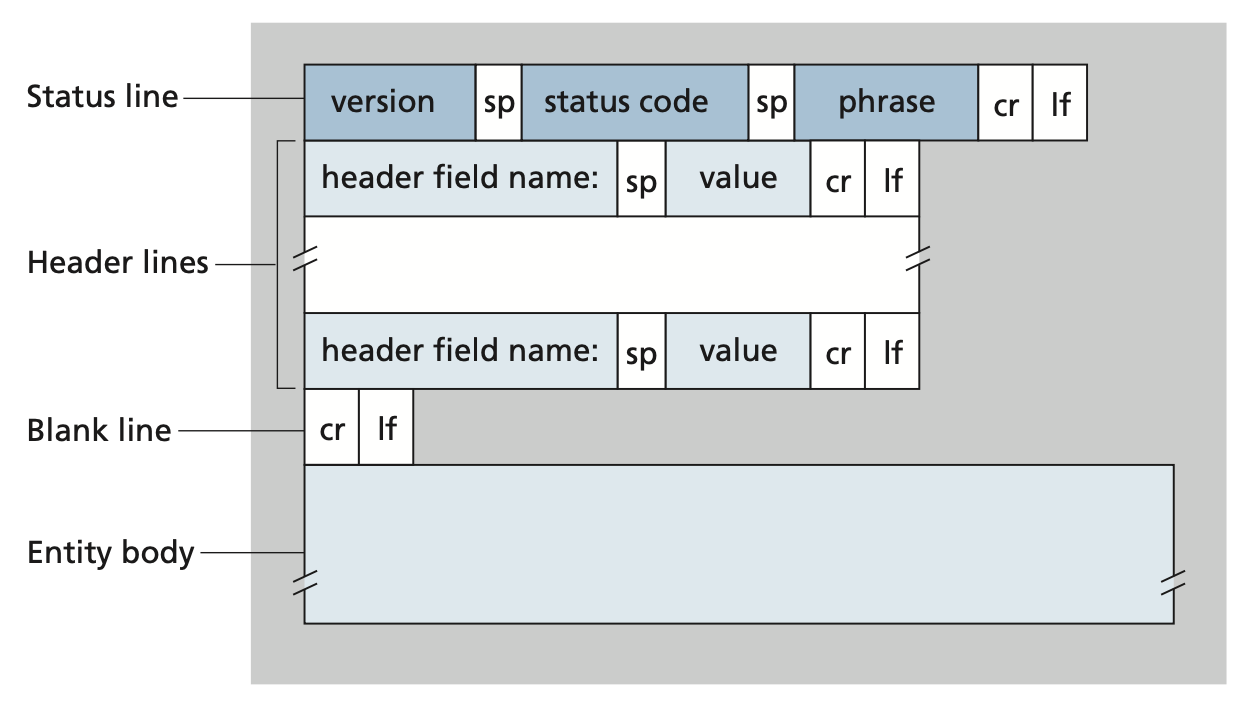
The first line of an HTTP response message is the status line which has 3 fields:
- Version: the version of HTTP used in the response.
- Status code: a 3-digit code that provides information about the request.
- Phrase: a text description associated with the status code.
The next six lines are header lines that display additional information about the request.
Response codes
-
Classes
There are five classes of status codes:
1xx: Provides information and does not affect the processing of the request.2xx: Returned when a request succeeds.3xx: Returned when the server redirects the client.4xx: Signifies improper requests from the client. For example, requesting a resource that doesn’t exist or requesting a bad format.5xx: Returned when there is some problem with the HTTP server itself.
-
Common codes
The most common status code and their phrases are:
200 OK: Request succeeded and the requested information is in the entity body of the response.301 Moved Permanently: The requested object has been permanently moved and the new URL for this object is specified in theLocationheader of the response.400 Bad Request: A generic error code indicating that the request could not be understood by the server.404 Not Found: The requested document does not exist on the server.505 HTTP Version Not Supported: The requested HTTP protocol version is not supported by the server.
Examples
Request message format
A typical HTTP request message format that gets a page object from a school website using Mozilla Firefox, preferably in French if available.
GET /somedir/page.html HTTP/1.1
Host: www.someschool.edu
Connection: close
User-agent: Mozilla/5.0 Accept-language: fr
Response message format
HTTP/1.1 200 OK
Connection: close
Date: Tue, 18 Aug 2015 15:44:04 GMT
Server: Apache/2.2.3 (CentOS)
Last-Modified: Tue, 18 Aug 2015 15:11:03 GMT Content-Length: 6821
Content-Type: text/html

(data data data data data ...)